
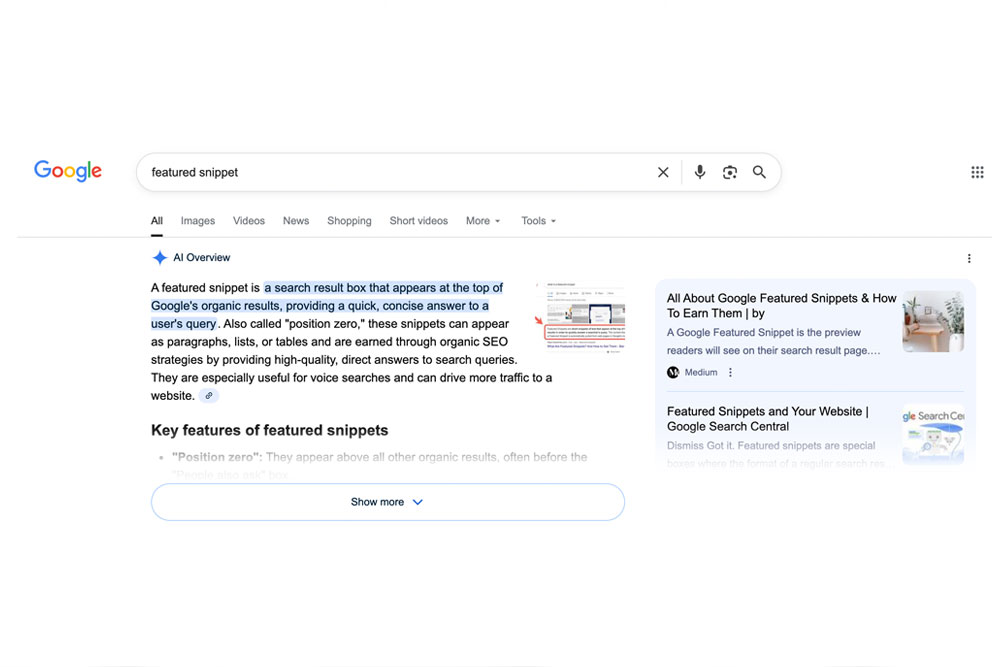
Did you know you can jump to the #1 position in Google without actually ranking #1?
No, it’s not a glitch. And no, I’m not talking about running ads.
I’m talking about featured snippets. Those beautiful “quick answers” that appear above all other organic results.
The crazy part? You don’t even need to be number one on the page to get them.
In fact, anyone ranking on the first page has a shot at stealing that golden “Position Zero.” And once you know how Google selects these snippets, you can systematically take them from your competitors.
Today, I’m going to show you exactly how to do that.
Let’s get into it.
What Exactly Are Featured Snippets?
If you’ve ever searched for something like “what is SEO,” you’ve probably seen a box at the top with a short paragraph, list, or table explaining it.
That’s a featured snippet.
It’s Google’s way of answering a searcher’s question directly in the results, so users don’t even have to click a site (though, let’s be real, many still do).
Featured snippets can massively increase your visibility and CTR. They dominate screen space and instantly establish your site as an authority.
And here’s the kicker: any page on the first page of Google can earn it.
That means if you’re ranking anywhere from positions #2–#10, you can literally steal the top spot without building another link or rewriting your entire post.
The 4 Main Types of Featured Snippets
Before you start stealing them, you need to know what you’re up against.
1. Paragraph Snippets
The most common type. Usually 40–60 words of text that answer a direct question like “What is link building?”
Tip: Use a clear question as your heading (H2/H3), and answer it immediately in a single, concise paragraph.
2. List Snippets
Google loves lists, especially for how-to guides and step-by-step content. There are two types: ordered (numbered) and unordered (bulleted).
Examples:
- “How to create a blog” → ordered list
- “Best SEO tools” → unordered list
3. Table Snippets
Used when Google wants to display comparisons, pricing, or data. Think:
| Product | Price | Rating |
Keep your tables clean, well-structured, and easy for crawlers to understand.
4. Video Snippets
Yes, YouTube is Google’s baby, and it’s hogging more snippet space than ever.
You’ll often see timestamps highlighted within videos (“Jump to 2:34 for the answer”).
If you’re doing video SEO, optimize your descriptions, titles, and even timestamps with snippet-friendly queries.
But, Won’t This Mean Less Traffic?
This is the classic objection. If Google is already giving people the answer, why would anyone click your link?
Here’s the truth: most searches are too complex for a two-line summary.
That tiny answer box acts like a trust badge. It shows that you’re the authority, which makes users more likely to click through.
On average, I see a 15–30% traffic increase for pages that win a snippet.
Even better? Once you get one snippet, others tend to follow. Google likes predictable formatting and consistent structure. It’s a pattern game.
How to Steal Google’s Featured Snippets: 15 Proven Methods
Now for the fun part.
These are the 15 battle-tested methods to find, optimize for, and outright steal featured snippets from your competitors.
1. Identify Featured Snippet Opportunities
Go into Ahrefs → Site Explorer → Organic Keywords → SERP Features.
Tick the “Featured Snippet” box.
This shows all the keywords your site ranks for that have a snippet.
You’ll see which ones you already own (marked by a quote icon) and which ones you can steal.
Prioritize keywords where you’re already in the top 5, they’re your low-hanging fruit.
2. Match the Current Snippet Format
If Google is showing a paragraph snippet, don’t try to replace it with a list. If it’s a table, don’t write a paragraph.
First, match what Google is already rewarding.
Later, once you own it, you can experiment with alternative formats. But first, win the game being played.
3. Target Long-Tail, Question-Based Keywords
Featured snippets love “how,” “what,” “why,” and “when” phrases.
Queries like “how to optimize for featured snippets” or “what is canonical URL” are perfect targets.
Use tools like AlsoAsked or AnswerThePublic to find related questions.
Then, answer them clearly and concisely in your post.
4. Use Descriptive, Keyword-Rich Headings
Put the exact query in your heading.
If the keyword is “how to write meta descriptions”, then literally make your heading:
“How to Write Meta Descriptions”
Google matches question → heading → immediate answer.
That structure alone boosts your odds of being selected.
5. Keep Your Answer Under 300 Characters
Most snippets are between 40–60 words or 250–300 characters.
Cut the fluff.
Be direct, factual, and precise.
Example:
A featured snippet is a short summary that appears at the top of Google’s search results to quickly answer a user’s query.
Simple. Sharp. Perfect.
6. Use Related Terms and Synonyms
Google’s algorithm understands entities and relationships.
Include synonyms, variations, and related keywords throughout your content.
Search your target query and note which words Google bolds in the results. Those are the contextual signals you need.
The Chrome extension SEO Ruler can extract them all for you automatically.
7. Add Tables and Lists Where Possible
Even if your competitors don’t use them, Google loves structured data.
Turn data, comparisons, and processes into tables or numbered lists.
Example:
| Rank | SEO Tool | Price |
| 1 | Ahrefs | $99 |
| 2 | Semrush | $119 |
This gives Google clear structure and increases your snippet eligibility.
8. Add More List Items Than Competitors
If your competitor lists 6 steps or 8 products, make yours 10 or 12.
Sometimes, just adding more gives you the edge.
Why? Because Google sees your post as more complete.
I’ve won snippets from posts that were nearly identical, just because ours had more detailed lists.
9. Add Short Summaries or TL;DR Sections
Start your post with a quick summary or overview table.
These are perfect snippet material: short, structured, and context-rich.
Bonus: Add a “table of contents” plugin to create clickable anchors (WordPress has tons). Google often uses these as jump links within snippets.
10. Optimize for ‘People Also Ask’ (PAA) Boxes
Every featured snippet lives close to the People Also Ask section.
Answer those questions within your article.
You’ll naturally include language that aligns with what Google already considers relevant.
Think of PAA optimization as training data for Google to understand your authority.
11. Improve Your On-Page Formatting
Use clean HTML.
If you’re using page builders like Thrive, Divi, or Elementor, beware of excessive
Messy code can confuse crawlers and prevent snippet extraction.
Keep your content structure simple:
What Is a Featured Snippet?
A featured snippet is…
Clean, semantic, and easy for Google to parse.
12. Add Relevant Images Next to Key Sections
Google sometimes includes images with snippets, even pulling them from different domains.
Give yourself an edge by:
- Adding an image near your snippet-worthy content
- Using keyword-rich filenames (e.g. “featured-snippet-example.jpg”)
- Writing descriptive alt text
Even if Google doesn’t use it in the snippet, it helps your CTR and on-page SEO.
13. Use Schema Markup Where It Makes Sense
FAQ, HowTo, and Table schemas help clarify structure for Google.
It’s not required for snippets, but it does reinforce what your content is about.
If you’re writing “how to fix a 404 error,” use HowTo schema to map out each step.
It’s basically spoon-feeding Google your structure.
14. Force Google to Recrawl After Updates
After optimizing, go to Google Search Console → URL Inspection → enter your page → click “Request Indexing.”
This triggers a near-instant recrawl.
If you made the right changes, you might steal the snippet within minutes.
I’ve seen it happen over coffee breaks, literally.
15. Monitor, Refine, Repeat
Featured snippets are volatile. You can gain or lose them overnight.
Set up tracking with Ahrefs, Semrush, or AccuRanker to monitor changes.
If you lose one, inspect what changed. Maybe your competitor reformatted their heading, shortened their paragraph, or added a table.
Update accordingly.
Stealing snippets isn’t a one-time hack. It’s a process of refinement.
Bonus Tips for Featured Snippets
- Use Internal Linking: Connect snippet-winning pages to other important pages. It spreads authority.
- Write for Humans, Not Just Google: Snippets reward clarity, not keyword stuffing.
- Batch Optimize: Once you master this process, you can optimize dozens of pages in a day.
The more snippet-friendly pages you create, the more chances you have to dominate multiple queries.
Wrapping Up
There’s a reason SEOs are obsessed with featured snippets: they’re free exposure.
You don’t have to outrank your competitors, just outsmart them.
Follow these 15 strategies, and you’ll not only steal Google’s snippets but also keep them long-term.
Start with one page. Analyze, optimize, and request reindexing. Then move to the next.
Soon, you’ll own the SERPs for your niche, without spending a cent more on ads or backlinks.
Let’s go steal some snippets. 🚀